ITパスポート試験|情報セキュリティの基礎知識と対策 IT Passport Exam | Information Security: Fundamentals and Security Measures
ITパスポート試験では、「情報セキュリティ」の分野から毎回多くの問題が出題されます。「セキュリティという言葉はよく聞くけれど、試験で問われる内容はよくわからない」という方も大丈夫です。本記事では、ITや情報システムを初めて学ぶ方でも「なるほど」とイメージできるよう、やさしい言葉でていねいに解説します。
The IT Passport exam includes a large number of questions from the “information security” domain every year. If your reaction is “I hear the word ‘security’ all the time, but I’m not sure what the exam actually tests,” don’t worry. This article uses plain, accessible language so that even readers encountering IT and information systems for the first time can build a clear mental picture.
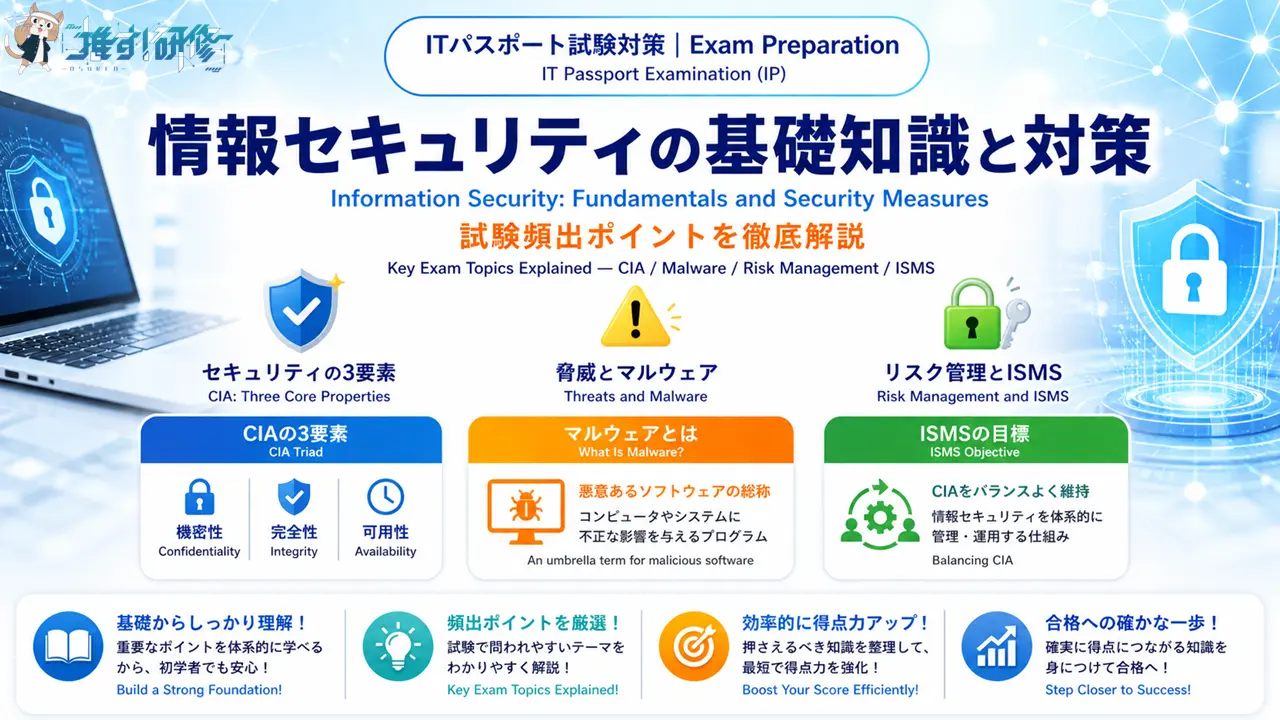
情報セキュリティの基本概念から、脅威の種類・マルウェア・各種攻撃手法・リスクマネジメント・ISMS・デジタル署名まで、試験頻出テーマを網羅的に解説します。
This article covers all the frequently tested topics in a comprehensive way: the basic concept of information security, types of threats, malware, various attack methods, risk management, ISMS, and digital signatures.
目次
情報セキュリティとは / What Is Information Security?
情報セキュリティとは、組織や個人が持つ大切な情報(情報資産)を、様々な脅威から守るための取り組み全体のことです。インターネットが私たちの生活に欠かせない存在となった一方で、使い方を間違えたり、悪意のある人が利用したりすることで、これまでには存在しなかったリスクも生まれています。このような新しいリスクに対して安全を確保することを情報セキュリティといいます。
Information security refers to the full range of efforts made to protect the valuable information (information assets) held by organizations and individuals from various threats. As the internet has become indispensable to our daily lives, new risks have emerged — from human error to malicious actors. Ensuring safety against these new risks is what information security is all about.
情報セキュリティの3要素(CIA) / The Three Elements of Information Security (CIA)
情報セキュリティの目標は、次の3つの性質を維持することです。機密性(Confidentiality)とは、認められた人だけが情報にアクセスできる状態を保つことです。完全性(Integrity)とは、情報が正確で改ざんや破壊が行われていない状態を保つことです。可用性(Availability)とは、必要なときに情報やシステムを使える状態を保つことです。この3つの頭文字を取って「CIA」と呼びます。
The goal of information security is to maintain three properties. Confidentiality means ensuring that only authorized people can access information. Integrity means ensuring that information is accurate and free from unauthorized modification or destruction. Availability means ensuring that information and systems can be used whenever they are needed. The first letters of these three properties form the abbreviation “CIA.”
試験では、CIA それぞれの具体例が問われます。機密性が失われる例としては、「機密情報が格納されたUSBメモリが盗難にあった」「社内のサーバに不正侵入されて情報が消えた」などがあります。完全性が失われる例としては、「顧客情報管理システムの顧客情報が誤った内容のまま運用されていた」「Webページが改ざんされていた」などがあります。可用性が失われる例としては、「取引先との電子決済システムがDoS攻撃を受け処理ができなくなった」「空調の故障で温度が上がりサーバが停止した」などがあります。
The exam tests specific examples of each CIA element. Examples of lost confidentiality include “a USB memory stick containing confidential data was stolen” and “unauthorized access to a company server caused information to disappear.” Examples of lost integrity include “customer data in a management system was operated with incorrect entries” and “a webpage was defaced.” Examples of lost availability include “a payment system was disrupted by a DoS attack” and “an air-conditioning failure caused server temperatures to rise and the server to shut down.”
情報セキュリティの脅威 / Information Security Threats
情報セキュリティを脅かすリスク要因を「脅威」といいます。脅威は大きく次の3つに分類できます。
The risk factors that threaten information security are called “threats.” Threats can be broadly classified into the following three categories.
人的脅威とは、人によって引き起こされる脅威です。社員が誤操作でデータを消してしまうことや、悪意を持った人がコンピュータに不正アクセスすることが例として挙げられます。技術的脅威とは、技術的な手段によって引き起こされる脅威です。コンピュータウイルスなどがその例です。人的脅威と区別するポイントは「最終的な手段が人によるものか、技術によるものか」です。物理的脅威とは、施設や機器などが物理的な手段によって直接的に損害を受ける脅威です。災害・停電・盗難・破壊などがあります。
Human threats are threats caused by people — for example, an employee accidentally deleting data, or a malicious individual gaining unauthorized access to a computer. Technical threats are threats brought about by technical means, such as computer viruses. The key distinction from human threats is whether the threat is caused directly by human action or by technological mechanisms. Physical threats are threats in which facilities or equipment suffer direct damage through physical means — including natural disasters, power outages, theft, and vandalism.
人的脅威:ソーシャルエンジニアリング / Human Threats: Social Engineering
ソーシャルエンジニアリングとは、特別なツールや技術は使わず、人間の心理的な隙を利用して秘密情報を手に入れることです。コンピューターではなく「人間」そのものを攻撃の対象にするため、どんなに強固なセキュリティシステムを持っていても、人が騙されてしまえば情報は流出します。
Social engineering refers to obtaining confidential information by exploiting psychological gaps in human behavior, without using any special tools or technical means. Because it targets “people” rather than computers, even the most robust security system cannot prevent a breach if a person is tricked into giving up information.
ソーシャルエンジニアリングの具体的な手口 / Common Social Engineering Tactics
なりすましは、本人のふりをして電話をかけたり、システム管理者や上司を装ってパスワードや機密情報を聞き出す手口です。ショルダーハック(のぞき見)は、他人がパスワードなどの秘密の情報を入力しているところを肩越しに盗み見ることです。トラッシング(ゴミ箱あさり)は、捨てられた書類や記録媒体からIDやパスワードなどの情報を盗み出すことです。
Impersonation involves calling while pretending to be someone else — such as a system administrator or supervisor — to extract passwords or confidential information. Shoulder surfing involves looking over someone’s shoulder to steal passwords or other secret information while they type. Dumpster diving (trashing) involves stealing IDs, passwords, and other information from discarded documents or storage media.
重要ポイント / Key Point
ソーシャルエンジニアリングへの対策は「人の行動に関するルールと教育」が基本です。暗号化通信・ファームウェア更新・マルウェア対策ソフトの導入は有効なセキュリティ対策ですが、ソーシャルエンジニアリング対策ではありません。IoT機器を廃棄するときは、内蔵されている記憶装置のデータを完全に消去するか、物理的に破壊することがソーシャルエンジニアリング対策として有効です。
The foundation of countermeasures against social engineering is “rules and training related to human behavior.” Encrypted communication, firmware updates, and anti-malware software are all valid security measures, but they do not address social engineering. When disposing of IoT devices, completely erasing the data on built-in storage or physically destroying it is an effective social engineering countermeasure.
技術的脅威:マルウェアの種類 / Technical Threats: Types of Malware
マルウェア(Malware)とは、悪意のあるソフトウェアの総称です。「Malicious(悪意ある)」と「Software(ソフトウェア)」をつなげた造語です。ボット・スパイウェア・ランサムウェア・コンピュータウイルス・トロイの木馬などはすべてマルウェアの一種です。試験では各マルウェアの「どんな動きをするか」を答えさせる問題がよく出ます。
Malware is a general term for software with malicious intent. It is a coined word combining “Malicious” and “Software.” Bots, spyware, ransomware, computer viruses, and Trojan horses are all types of malware. The exam frequently asks you to identify “what each type of malware does.”
主なマルウェアの種類と特徴は以下のとおりです。ボット(Bot)とは、多数のPCに感染し、攻撃者から指令を受けると一斉攻撃などの動作を行うプログラムです。通常、攻撃者はボットを感染させたPCを遠隔から操作します。「Robot」の略称で、感染させたコンピュータをロボットのように操ることからこのように呼ばれます。スパイウェア(Spyware)とは、利用者に気づかれないように個人情報などを収集するプログラムです。「Spy(諜員)」と「Software」をつなげた造語です。ランサムウェア(Ransomware)とは、PCやファイルを使用不能にしたうえで、回復のための金銭を要求するソフトウェアです。感染すると勝手にファイルやデータが暗号化されてしまい、正常にアクセスできなくなります。「Ransom(身代金)」と「Software」をつなげた造語です。トロイの木馬とは、有用であるかのように見せかけて利用者にインストールさせ、コンピュータに侵入するソフトウェアです。RAT(Remote Administration Tool)とは、物理的に離れたパソコンをネットワーク経由で遠隔操作するマルウェアです。バックドア(Backdoor)とは、システムに意図的に設けられた秘密のアクセス経路です。バックドアが設置されると、攻撃者がシステムに簡単に再侵入できてしまいます。「裏口」という意味で、正規の入口ではなく裏口から不正アクセスを行うことからこのように呼ばれます。
The main types of malware and their characteristics are as follows. A bot is a program that infects a large number of PCs and, upon receiving instructions from an attacker, carries out coordinated attacks. The attacker typically controls infected PCs remotely. The word comes from “robot” — the infected computers are manipulated like robots. Spyware is a program that collects personal information and other data without the user’s knowledge. It combines “spy” and “software.” Ransomware renders PCs or files unusable and then demands a payment for their recovery. After infection, files and data are encrypted without permission, making normal access impossible. It combines “ransom” and “software.” A Trojan horse is software that disguises itself as a useful application to get users to install it, then infiltrates the computer. A RAT (Remote Administration Tool / Remote Access Tool) is malware that remotely controls a physically distant computer via a network. A backdoor is a secret access path intentionally placed in a system. Once a backdoor is installed, an attacker can easily re-enter the system. The name comes from the idea of using a “back door” rather than the official entrance to gain unauthorized access.
技術的脅威:各種攻撃手法 / Technical Threats: Various Attack Methods
マルウェア以外にも、様々な技術的な攻撃手法があります。試験では名前と内容の組み合わせを問う問題がよく出ます。それぞれの特徴をしっかり区別して覚えましょう。
Beyond malware, there are many other technical attack methods. The exam frequently tests matching each method’s name with its description. Make sure you can clearly distinguish the characteristics of each.
パスワードを狙う攻撃 / Attacks Targeting Passwords
パスワードを不正に入手しようとする攻撃には3種類があります。総当たり攻撃(ブルートフォース攻撃)とは、パスワードとして考えられる文字列のすべての組み合わせを実行してパスワードを割り出す攻撃です。辞書攻撃とは、辞書や人名録などに載っている単語をすべて試してパスワードを割り出す攻撃です。パスワードリスト攻撃(リストベースド攻撃)とは、他のサービスから不正に入手したIDとパスワードの一覧を使って、正規ルートから不正アクセスをする攻撃です。この3つは内容が似ているため、混同しないよう注意が必要です。
There are three types of attacks aimed at obtaining passwords illegitimately. A brute force attack tries every possible combination of characters that could be a password until the correct one is found. A dictionary attack tries every word listed in dictionaries and name directories until the password is cracked. A password list attack (list-based attack) uses a list of IDs and passwords illegally obtained from other services to attempt unauthorized access through the legitimate login route. Because these three methods are similar, take care not to confuse them.
ネットワーク・Webへの攻撃 / Network and Web Attacks
DoS攻撃(Denial of Service Attack)とは、電子メールやWebサーバへの要求(Webリクエスト)などを大量に送りつけて、ネットワーク上のサービスを提供不能にすることです。「Denial of Service」は「サービス妨害」という意味です。複数のコンピュータから一斉に攻撃を行うものを特にDDoS攻撃といいます。クロスサイトスクリプティング(XSS)とは、WebページにユーザーのInputデータをそのまま表示するフォーム、または処理があるときに、第三者が悪意あるスクリプトを埋め込むことで、Cookieなどのデータを盗み出す攻撃です。
A DoS attack (Denial of Service attack) floods a mail or web server with a massive volume of requests in order to make the service unavailable on the network. When the attack is launched simultaneously from multiple computers, it is specifically called a DDoS attack. Cross-site scripting (XSS) is an attack in which a third party embeds a malicious script into a web form that displays user input data without proper sanitization, allowing data such as cookies to be stolen.
その他の技術的脅威 / Other Technical Threats
フィッシング(Phishing)とは、金融機関などを装い、利用者を偽サイトに誘導し、暗証番号やクレジットカード番号などを入力させて、それらを不正に取得することです。SPAMとは、受信者の承諾なしに無差別に送付されるメールのことです。オートランとは、外部記憶媒体をPCに接続した際に、自動的にその媒体の中のプログラムを実行するOSの機能です。この機能が悪用されると、USBメモリなどを差し込んだだけでマルウェアが自動的に起動して感染するおそれがあります。そのため、セキュリティ対策としてオートランを無効にすることが推奨されています。セキュリティホールとは、不正アクセスなどに利用される、コンピュータシステムやネットワークに存在する弱点や欠陥のことです。「脆弱性」とも呼ばれます。
Phishing involves impersonating a financial institution or similar organization, directing users to a fake website, and tricking them into entering PINs or credit card numbers in order to steal that information. Spam refers to email sent indiscriminately to recipients without their consent. Autorun is an OS feature that automatically executes programs on an external storage medium when it is connected to a PC. If exploited, simply inserting a USB stick can cause malware to launch and infect the system automatically. For this reason, disabling autorun is recommended as a security measure. A security hole is a vulnerability or flaw in a computer system or network that can be exploited for unauthorized access. It is also called a “vulnerability” (脆弱性).
リスクマネジメント / Risk Management
企業はさまざまなリスクから会社の資産を守るために、多くの対策を行います。しかし、すべてのリスクに対策を講じようとすると費用がかかりすぎてしまいます。そこで必要になるのがリスクマネジメントです。リスクマネジメントとは、会社の活動に伴って発生するあらゆるリスクを管理し、そのリスクによる損失を最小の費用で食い止めるためのプロセスです。
Companies take many measures to protect their assets from various risks. However, trying to address every possible risk would be prohibitively expensive. This is where risk management becomes necessary. Risk management is the process of managing all the risks that arise from a company’s activities and minimizing losses from those risks in a cost-effective manner.
リスクマネジメントの4つのプロセス / The Four Processes of Risk Management
リスクマネジメントは次の順番で各プロセスを行います。①リスク特定:リスクを洗い出します。②リスク分析:特定したリスクの発生確率と、損害の大きさを調べます。③リスク評価:発生確率と損害の大きさからリスクに優先順位をつけます。④リスク対応:どのような対処を、いつまでに行うかを決めます。なお、前半3つのプロセス(リスク特定・リスク分析・リスク評価)を合わせて「リスクアセスメント」といいます。
Risk management is carried out through the following processes in order. ① Risk identification: identify all possible risks. ② Risk analysis: examine the probability of occurrence and the magnitude of damage for each identified risk. ③ Risk evaluation: assign priority to each risk based on its probability and potential damage. ④ Risk response: decide what action to take and by when. Note that the first three processes together (risk identification, analysis, and evaluation) are collectively called “risk assessment.”
4つのリスク対応策 / Four Risk Response Strategies
リスク対応の方法には、大きく4つがあります。リスク回避とは、脅威発生の要因を停止するか、まったく別の方法に変更することで、リスクが発生する可能性を取り去ることです。リスク低減とは、脆弱性に対して情報セキュリティ対策を講じることによって、問題発生の可能性を下げることです。リスク移転とは、リスクを他社などに移すことです(例:保険への加入)。リスク受容とは、リスクに対してセキュリティ対策を行わず、許容範囲内として受け入れることです。試験では4つのリスク対応の事例が問われます。事例は千差万別なので暗記ではなく、4つの意味をきちんと理解したうえで感覚を養うことが大切です。
There are four main risk response strategies. Risk avoidance means eliminating the possibility of a risk occurring by stopping the activity that causes the threat or switching to a completely different approach. Risk reduction means lowering the probability of a problem occurring by implementing information security measures against vulnerabilities. Risk transfer means shifting the risk to another party, such as by taking out insurance. Risk acceptance means choosing not to implement security measures against a risk and accepting it as within a tolerable range. The exam tests scenarios for all four strategies. Since scenarios vary widely, the key is to truly understand the meaning of each strategy rather than to memorize examples.
情報セキュリティマネジメントとISMS / Information Security Management and ISMS
情報セキュリティマネジメントとは、情報セキュリティの確保に組織的・体系的に取り組むこと(つまり「情報セキュリティを管理すること」)です。情報セキュリティマネジメントはリスクマネジメントの要素の1つです。リスクマネジメントが「組織のあらゆるリスク」を対象にするのに対し、情報セキュリティマネジメントは「経営資源の1つである情報に対するリスク」を対象としたマネジメントです。
Information security management refers to systematically and organizationally working to ensure information security — in simple terms, “managing information security.” It is one component of risk management. While risk management covers all risks facing the organization, information security management focuses specifically on risks related to information — one of the organization’s management resources.
ISMSとは / What Is ISMS?
ISMS(Information Security Management System:情報セキュリティマネジメントシステム)とは、組織の情報資産について、機密性・完全性・可用性の3つをバランスよく維持・改善するための仕組みです。「バランスよく」というのは「コストパフォーマンスを考えて」ということで、経営資源は有限なので、ISMSではコストパフォーマンスを考慮することが重要です。ISMSはJIS Q 27001(国際規格はISO/IEC 27001)で規定されています。
ISMS (Information Security Management System) is a framework for maintaining and improving, in a balanced way, the three properties of confidentiality, integrity, and availability with respect to an organization’s information assets. “Balanced” here means “with cost-effectiveness in mind” — since management resources are finite, considering cost-performance is essential in ISMS. ISMS is defined by JIS Q 27001 (internationally, ISO/IEC 27001).
ISMSにおけるPDCA / PDCA in ISMS
情報セキュリティへの脅威は社会や技術の変化で絶えず変わります。一度対策を行ったら終わりではなく、常に改善し続けることが必要です。そのため、ISMSはPDCAサイクルを取り入れています。ISMSにおけるPDCAは次のように対応します。P(Plan:計画)はISMSの確立、D(Do:実行)はISMSの導入および運用、C(Check:点検)はISMSの監視およびレビュー、A(Act:処置)はISMSの維持および改善です。試験では「是正処置がPDCAのどれにあたるか」という問題が出ることがあります。是正処置はA(Act:処置)にあたります。
Threats to information security change constantly as society and technology evolve. Security work is never “done” — continuous improvement is required. For this reason, ISMS incorporates the PDCA cycle. In ISMS, the PDCA stages correspond as follows: P (Plan) = establishing the ISMS; D (Do) = implementing and operating the ISMS; C (Check) = monitoring and reviewing the ISMS; A (Act) = maintaining and improving the ISMS. The exam sometimes asks which stage of PDCA “corrective action” corresponds to — the answer is A (Act).
情報セキュリティポリシー / Information Security Policy
情報セキュリティポリシーとは、情報セキュリティに関するその組織の取組み・対策をまとめた文書です。従業員によって情報資産の扱い方が異なると、情報セキュリティに関するリスクが高まってしまうため、組織全体でルールを統一する目的で作成されます。情報セキュリティポリシーは次の3つの文書で構成されます。
An information security policy is a document that compiles an organization’s approach and measures relating to information security. Because differences in how individual employees handle information assets increase security risks, the policy is created to unify rules across the entire organization. An information security policy consists of the following three documents.
情報セキュリティ基本方針は、情報セキュリティに関する取組みを示す文書です。経営の上位者が策定し、全従業員と社外の利用関係者に公表します。内容は組織全体で統一されます。情報セキュリティ対策基準は、情報セキュリティ基本方針で作成した目標を達成するためのルール集です。具体的には人事規定や就業規則などの規定類であり、情報セキュリティ対策として「何をするのか」を記述します。各部門で異なる内容となり、社内関係者に公開されます。情報セキュリティ実施手順は、情報セキュリティ対策基準で定めたルールを実施するための手順書(マニュアル)です。情報セキュリティ対策を「どのように行うのか」を記述します。この文書は外部には公開しません。なぜなら、情報を守る手順が悪意のある人に知られてしまうと、手順をくぐり抜けた攻撃を仕掛けられるリスクが高まるからです。
The information security basic policy is a document showing the organization’s approach to information security. It is formulated by senior management and published to all employees and external stakeholders. Its content is unified across the entire organization. The information security control standards are a set of rules for achieving the targets established in the basic policy. In concrete terms, these are regulations such as personnel rules and work rules, describing “what to do” as security measures. The content varies by department and is disclosed only to internal stakeholders. The information security implementation procedures are a manual for carrying out the rules defined in the countermeasure standards, describing “how to carry out” each security measure. This document is not disclosed externally, because if the procedures for protecting information were known to a malicious actor, the risk of attacks designed to circumvent those procedures would increase.
重要ポイント / Key Point
情報セキュリティポリシーは、企業が取りまとめた社内ルールです。国や国民が守るべき法律ではありません。一方、サイバーセキュリティ基本法はサイバー攻撃から国を守るための基本理念を定めた法律です。「社内ルールか、国の法律か」という違いをしっかり区別して覚えましょう。
An information security policy is an internal company rule compiled by the organization itself. It is not a law that the country or its citizens are legally required to follow. The Cybersecurity Basic Law, by contrast, is a law that establishes the fundamental principles for protecting the nation from cyberattacks. Make sure you can clearly distinguish: “internal company rule vs. national law.”
ISMSクラウドセキュリティ認証 / ISMS Cloud Security Certification
近年、多くの企業がクラウドサービスを利用するようになりました。クラウドサービスには、従来の情報システムとは異なるクラウド固有のセキュリティリスクが存在します。そのため、通常のISMS認証(JIS Q 27001)にクラウドサービス固有の管理策を追加した認証制度として「ISMSクラウドセキュリティ認証」が作られました。根拠となる国際規格はISO/IEC 27017で、2015年12月に発行されました。
In recent years, many companies have begun using cloud services. Cloud services carry security risks unique to the cloud environment, distinct from those of traditional information systems. For this reason, “ISMS Cloud Security Certification” was created as a certification scheme that adds management controls specific to cloud services on top of standard ISMS certification (JIS Q 27001). The underlying international standard is ISO/IEC 27017, published in December 2015.
重要ポイント / Key Point
ISMSクラウドセキュリティ認証は「クラウドサービス固有の管理策が実施されていること」を認証する制度です。「シングルサインオン(一度の認証で複数サービスにアクセス)」「プライバシーマーク(個人情報保護体制の認定)」「リスクベース認証(ログイン環境のリスクに応じた追加認証)」とは、それぞれ別の仕組みです。
ISMS Cloud Security Certification certifies that management controls specific to cloud services are being implemented. It is distinct from Single Sign-On (accessing multiple services with one authentication), the Privacy Mark (certifying personal information protection systems), and risk-based authentication (adding extra authentication based on assessed login risk).
デジタル署名とコード署名 / Digital Signatures and Code Signing
インターネット上でデータをやり取りするとき、「このデータは本当に信頼できる相手から届いたものか」「途中で改ざんされていないか」を確認する仕組みが必要です。そのために使われるのがデジタル署名です。デジタル署名を使うと、「データが改ざんされていないこと(完全性)」と「データの発行元が正しい送信者であること(真正性)」の2つを同時に確認できます。
When exchanging data over the internet, a mechanism is needed to confirm: “Did this data really come from a trustworthy source?” and “Was it altered somewhere along the way?” The technology used for this purpose is the digital signature. Using a digital signature allows you to verify two things simultaneously: that the data has not been altered (integrity), and that the sender is genuinely who they claim to be (authenticity).
公開鍵暗号方式の仕組み / How Public-Key Cryptography Works
公開鍵暗号方式では、1人のユーザーが2種類の鍵を持ちます。公開鍵は誰にでも配ってよい鍵で、秘密鍵は絶対に自分だけが持つ鍵です。この2つの鍵はペアになっており、一方で処理したデータはもう一方の鍵でしか元に戻せません。デジタル署名では、送信者は送るデータを秘密鍵で処理して「署名」を作り、受信者は送信者の公開鍵を使ってその署名を検証します。公開鍵で検証できた場合、「正しい送信者が送った」こと、かつ「データが改ざんされていない」ことの両方が証明されます。
In public-key cryptography, each user holds two types of keys: a public key that can be freely distributed to anyone, and a private key that must be kept exclusively by its owner. These two keys form a matched pair — data processed with one can only be reversed with the other. In a digital signature, the sender processes the data with their private key to create a “signature,” and the recipient verifies it using the sender’s public key. If verification succeeds, it proves both that the data came from the legitimate sender and that it has not been altered.
コード署名とは / What Is Code Signing?
コード署名とは、ソフトウェアの実行プログラムやそのソースコードに対して、改ざんされていないこと(完全性)および発行元が正当であること(真正性)を保証するためにデジタル署名を付与したものをいいます。出所が不明なプログラムファイルの発行元を確認したいとき、確認すべき情報はデジタル署名(コード署名)です。
Code signing refers to the application of a digital signature to a software executable or its source code to guarantee that it has not been tampered with (integrity) and that its publisher is legitimate (authenticity). When you want to verify the publisher of a program file of unknown origin, the information to check is its digital signature (code signature).
重要ポイント / Key Point
「発行元の確認」にはデジタル署名が必要です。アクセス権は「誰がファイルを使えるか」の制限、所有者情報は「購入者や利用者」に関する情報、ハッシュ値は「改ざんの有無の検知」には使えますが「発行元の確認」はできません。
Verifying the “publisher” requires a digital signature. Access permissions control “who can use the file.” Owner information relates to the purchaser or current user. A hash value can detect whether data has been tampered with, but it cannot identify the publisher.
まとめ / Summary
ITパスポート試験における情報セキュリティの重要ポイントをまとめます。
Here is a summary of the key points on information security for the IT Passport exam.
- 情報セキュリティの3要素(CIA) 機密性・完全性・可用性。試験では各要素の具体例を見極める問題が出る
CIA — Confidentiality, Integrity, Availability. The exam asks you to identify concrete examples of each - 脅威の3分類 人的脅威(人間の行動)・技術的脅威(ツール・ソフト)・物理的脅威(直接的な物理損害)。区別のポイントは「最終手段が人か・技術か・物理か」
Three types of threats — Human, technical, and physical. The key distinction is whether the ultimate means is human, technical, or physical - マルウェアの種類 マルウェアは悪意あるソフトウェアの総称。ボット(遠隔指令で一斉攻撃)・スパイウェア(情報収集)・ランサムウェア(身代金要求)・トロイの木馬(有用に見せかけて侵入)を区別できるようにする
Types of malware — Malware is the umbrella term for malicious software. Be able to distinguish: bots (coordinated attacks on command), spyware (data collection), ransomware (ransom demands), and Trojan horses (infiltration disguised as legitimate software) - パスワード攻撃の3種類 総当たり(全組み合わせ)・辞書攻撃(辞書の単語を試す)・パスワードリスト攻撃(流出済みリストを使う)は混同しやすいため注意
Three password attack types — Brute force (all combinations), dictionary attack (words from a dictionary), and password list attack (using a leaked list). These are easy to confuse — take care - リスクマネジメントの流れ リスク特定→リスク分析→リスク評価(この3つをリスクアセスメントと呼ぶ)→リスク対応。4つのリスク対応策(回避・低減・移転・受容)の意味を理解する
Risk management flow — Risk identification → analysis → evaluation (these three are “risk assessment”) → response. Understand the meaning of the four response strategies: avoidance, reduction, transfer, and acceptance - 情報セキュリティポリシーの3文書 基本方針(全社統一・経営層策定・全員公開)→対策基準(部門別・規定類・社内公開)→実施手順(具体的なマニュアル・外部非公開)
Three documents of the information security policy — Basic policy (company-wide, formulated by management, published to all) → countermeasure standards (by department, internal rules, disclosed internally) → implementation procedures (specific manual, not disclosed externally) - デジタル署名・コード署名 完全性(改ざんなし)と真正性(正しい発行元)の両方を同時に証明。発行元の確認にはデジタル署名が必要であり、ハッシュ値だけでは発行元を特定できない
Digital/code signatures — Simultaneously prove both integrity (no tampering) and authenticity (correct publisher). Verifying the publisher requires a digital signature; a hash value alone cannot identify the publisher
練習問題 情報セキュリティの理解を確認しよう / Practice Questions: Test Your Understanding
ここまでの内容を試験形式で確認しましょう。解答と解説は各問題の直下に記載しています。
Let’s test what you’ve learned with some exam-style practice questions. The answer and explanation for each question appear directly below it.
本練習問題3問は、令和6年度 ITパスポート試験 公開過去問題(情報セキュリティ分野)より引用しています(問題1=問73、問題2=問77、問題3=問82)。
All three practice questions are taken from the IT Passport Examination — Official Past Questions, Reiwa 6 (2024), Information Security Domain (Question 1 = Item 73, Question 2 = Item 77, Question 3 = Item 82).
問題1 / Question 1
IoT機器のセキュリティ対策のうち、ソーシャルエンジニアリング対策として、最も適切なものはどれか。
Among the security measures for IoT devices, which of the following is the most appropriate countermeasure against social engineering?
- IoT機器とサーバとの通信は、盗聴を防止するために常に暗号化通信で行う。
Communication between IoT devices and servers is always conducted using encrypted communication to prevent eavesdropping. - IoT機器の脆弱性を突いた攻撃を防止するために、機器のメーカーから最新のファームウェアを入手してアップデートを行う。
To prevent attacks exploiting vulnerabilities in IoT devices, obtain the latest firmware from the device manufacturer and apply updates. - IoT機器へのマルウェア感染を防ぐためにマルウェア対策ソフトを導入する。
Install anti-malware software to prevent malware infections on IoT devices. - IoT機器を廃棄するときは、内蔵されている記憶装置からの情報漏えいを防止するために物理的に破壊する。
When disposing of IoT devices, physically destroy the built-in storage device to prevent information leakage.
解答:4 / Answer: 4
ソーシャルエンジニアリングとは、技術的な手段を使わず人間の心理的な隙を利用して情報を盗み出す手口です。IoT機器を廃棄する際には、記憶装置のデータを物理的に破壊することで情報漏えいを防ぐ対策がソーシャルエンジニアリング対策として有効です。選択肢1(暗号化通信)は盗聴対策、選択肢2(ファームウェア更新)はセキュリティホールをふさぐ不正アクセス対策、選択肢3(マルウェア対策ソフト)はマルウェア感染防止策であり、いずれも技術的脅威への対策であってソーシャルエンジニアリング対策ではありません。
Social engineering exploits psychological gaps in human behavior without using technical means. Physically destroying the storage device of an IoT device before disposal is an effective social engineering countermeasure that prevents information leakage. Options 1, 2, and 3 address technical threats — eavesdropping, security vulnerabilities, and malware infection respectively — and are not countermeasures against social engineering.
問題2 / Question 2
出所が不明のプログラムファイルの使用を避けるために、その発行元を調べたい。このときに確認する情報として、適切なものはどれか。
You want to investigate the publisher of a program file of unknown origin in order to avoid using it. Which of the following is the appropriate information to check?
- そのプログラムファイルのアクセス権
The access permissions of the program file - そのプログラムファイルの所有者情報
The owner information of the program file - そのプログラムファイルのデジタル署名
The digital signature of the program file - そのプログラムファイルのハッシュ値
The hash value of the program file
解答:3 / Answer: 3
コード署名(デジタル署名)には発行元の公開鍵証明書が含まれており、それによって発行元を特定できます。選択肢1(アクセス権)はファイルを使用できる人物を限定するためのもので発行元はわかりません。選択肢2(所有者情報)は購入者や利用者の情報なので発行元との直接関係がありません。選択肢4(ハッシュ値)はソフトウェアの改ざん検知には使えますが、発行元の確認はできません。
A code signature (digital signature) contains the publisher’s public-key certificate, which allows the publisher to be identified. Option 1 (access permissions) restricts who can use the file — it does not reveal the publisher. Option 2 (owner information) relates to the purchaser or user — it has no direct connection to the publisher. Option 4 (hash value) can detect tampering but cannot confirm the publisher.
問題3 / Question 3
ISMSクラウドセキュリティ認証に関する記述として、適切なものはどれか。
Which of the following is an accurate description of ISMS Cloud Security Certification?
- 一度認証するだけで、複数のクラウドサービスやシステムなどを利用できるようにする認証の仕組み
An authentication mechanism that, once certified, allows a user to access multiple cloud services and systems - クラウドサービスについて、クラウドサービス固有の管理策が実施されていることを認証する制度
A certification scheme that certifies, with respect to cloud services, that management controls specific to cloud services are being implemented - 個人情報について適切な保護措置を講ずる体制を整備しているクラウド事業者などを評価して、事業活動に関してプライバシーマークの使用を認める制度
A scheme that evaluates cloud service providers that have established appropriate personal information protection systems and grants permission to use the Privacy Mark - 利用者がクラウドサービスへログインするときの環境、IPアドレスなどに基づいて状況を分析し、リスクが高いと判断された場合に追加の認証を行う仕組み
A mechanism that analyzes the login environment and IP address when a user accesses a cloud service, and requires additional authentication when the risk is assessed as high
解答:2 / Answer: 2
ISMSクラウドセキュリティ認証とは、情報セキュリティマネジメント認証(ISO/IEC 27002)に基づき、クラウドサービス固有の情報セキュリティ管理策の認証制度です。国際規格として「ISO/IEC 27017」が2015年12月に発行されました。選択肢1はシングルサインオン(SSO)の記述です。選択肢3はプライバシーマーク認証に関する記述です。選択肢4はリスクベース認証に関する記述です。
ISMS Cloud Security Certification is a certification scheme for information security management controls specific to cloud services, based on ISO/IEC 27002. The international standard ISO/IEC 27017 was published in December 2015. Option 1 describes Single Sign-On (SSO). Option 3 describes the Privacy Mark certification. Option 4 describes risk-based authentication.
- QC3|工程能力指数 Cp・Cpkの計算方法と評価基準 QC3 | Process Capability Index: Cp and Cpk Calculation and Evaluation Criteria
- 日商簿記3級|仕訳の基礎知識と借方・貸方のルール Nissho Bookkeeping Level 3 | Journal Entries: Fundamentals and Debit and Credit Rules
この記事を書いた人

関連記事
-
 ITパスポート試験の難易度は?合格率・合格基準・勉強時間を徹底解説 IT Passport Exam Difficulty: Pass Rates, Passing Criteria, and Study Time Explained
 -
ITパスポート試験|データベースの基礎知識と頻出問題 IT Passport Exam | Database: Fundamentals and Frequently Tested Topics
-
ITパスポート試験|プロジェクトマネジメントの基礎知識と計算問題 IT Passport Exam | Project Management: Fundamentals and Calculation Problems
-
ITパスポート試験|法務の基礎知識 IT Passport Exam | Legal Affairs: Fundamentals and Key Concepts
-
ITパスポート試験|サービスマネジメントの基礎知識 IT Passport Exam | Service Management: Fundamentals and Key Concepts
-
ITパスポート試験|開発技術の基礎知識とソフトウェア開発モデル IT Passport Exam | Development Technology: Fundamentals and Software Development Models